Best Purchase Order Software for Small Businesses
Small businesses often begin managing purchase orders with spreadsheets, email, paper forms, and shared folders. This may work when purchasing activity is limited, but the process becomes difficult to control as the number of suppliers, purchase requests, and orders increases.
Purchase managers may spend valuable time searching for the latest purchase order, checking whether an order was approved, following up with suppliers, or comparing current prices with previous purchases. Without a centralized system, it can also be difficult to monitor spending, track pending deliveries, and maintain a complete record for reporting or audits.
The best purchase order software for small businesses should solve these problems without creating the cost, complexity, or long implementation process associated with a large enterprise resource planning system.
A practical purchase order solution should help teams create purchase orders faster, manage suppliers, control approvals, track goods received, and review purchasing activity from one place. It should also be easy enough for employees to use without extensive technical training.
This guide explains the most important PO software features, provides a practical purchase order management checklist, and shows why EasyLPO may be a suitable choice for businesses that need better purchasing control without unnecessary complexity.
Why Small Businesses Need Purchase Order Software
Purchase order software is designed to organize and automate the purchasing process. Instead of managing purchase information across multiple spreadsheets, emails, and paper documents, the business can maintain purchase records in one centralized system.
A structured purchase order process provides better visibility into:
- What products or services have been requested
- Which supplier is being used
- The quantity and agreed purchase price
- Whether the purchase order has been approved
- Which orders have been sent to suppliers
- What goods have been received
- Which deliveries are still pending
- How much the company is spending by supplier, project, or period
A well-designed purchase order process can improve spending visibility, support approval policies, and create a clearer record for supplier discussions and audits.
For small businesses, the objective is not necessarily to implement a large and expensive ERP system. The objective is to remove repetitive administrative work while maintaining control over purchasing.
Common Purchase Management Problems
Purchase managers often experience the following challenges:
1. Too Much Manual Data Entry
Creating purchase orders in spreadsheets requires employees to repeatedly enter supplier information, item descriptions, quantities, prices, and delivery details.
Manual entry takes time and increases the possibility of errors. A dedicated system can store supplier and item information so that frequently used details can be selected instead of entered again.
2. Limited Visibility Into Purchase Status
When purchase orders are managed through email, it may be difficult to determine whether an order is:
- Waiting for approval
- Approved but not yet sent
- Sent to the supplier
- Partially delivered
- Fully received
- Still pending
A centralized dashboard can provide a clearer view of purchase activity and help managers identify orders that require attention.
3. Weak Budget and Spending Control
Without organized purchasing records, managers may struggle to review spending before approving new orders. It can also be difficult to compare supplier costs or identify purchasing trends.
Purchase reports help businesses analyze expenditure by supplier, project, item, or date range.
4. Enterprise Software May Be Too Complex
Large procurement and ERP systems may offer many advanced modules that a small business does not need. These systems can require significant implementation time, specialized training, and ongoing administration.
Many small businesses benefit more from focused, affordable PO software that provides the essential purchasing functions in a simple interface.
Key PO Software Features to Look For
The best purchase order software should support the complete purchase cycle, from the initial request through approval, supplier communication, delivery tracking, and reporting.
Purchase Order Creation
The software should make it easy to create professional purchase orders with:
- Supplier information
- Purchase order number
- Item descriptions
- Quantities
- Unit prices
- Taxes and totals
- Delivery details
- Payment terms
- Notes and conditions
Look for a system that allows users to select items and suppliers from saved records. This can reduce repetitive data entry and improve consistency.
Approval Workflows
Approval workflows are important for controlling purchasing commitments.
The software should allow managers or authorized users to review purchase orders before they are finalized or sent to suppliers.
An effective workflow should provide:
- Clear approval status
- Pending approval visibility
- Authorized approval controls
- A record of completed approvals
- Faster communication between purchasing teams and managers
Approval workflows help businesses reduce unauthorized purchases and maintain accountability.
Supplier Management
Supplier information should be stored in one organized location.
Useful supplier management features include:
- Supplier contact details
- Supplier categories
- Payment terms
- Purchase history
- Supplier documents
- Previous purchase prices
Centralized supplier records reduce the need to search through emails or separate files.
Item and Price Management
A useful purchase order system should maintain an item master containing:
- Item names and descriptions
- Categories
- Units of measurement
- Standard purchase prices
- Previous purchase information
Historical pricing can help purchase managers compare current supplier prices with earlier purchases and make more informed buying decisions.
Purchase Receipt and Delivery Tracking
Creating a purchase order is only one part of the purchasing process. The system should also help users record what has actually been delivered.
Look for the ability to track:
- Full deliveries
- Partial deliveries
- Pending quantities
- Completed orders
- Purchase receipt records
This feature helps purchasing teams identify which orders are still outstanding and provides a clearer record of received goods.
Reporting and Analytics
Reports help purchase managers turn purchase records into useful information.
Important reporting options may include:
- Supplier-wise purchase reports
- Project-wise purchase reports
- Date-wise purchase reports
- Item purchasing reports
- Purchase receipt reports
- Pending order reports
- Spending trends
The ability to export reports to Excel or PDF is also useful for management reviews, audits, and financial analysis.
Document Management
Purchase-related documents should be easy to access when required.
The software may allow businesses to attach documents to:
- Supplier records
- Purchase orders
- Purchase receipts
This can help keep quotations, supplier profiles, licenses, specifications, and other supporting records organized.
Custom Purchase Order Templates
Purchase orders are formal business documents. The software should allow companies to customize the document with their:
- Company logo
- Business address
- Contact information
- Standard terms
- Branding elements
- Preferred document layout
A professional and consistent purchase order format improves communication with suppliers.
Purchase Order Management Checklist
Use the following checklist when comparing purchase order software for your business.
| Evaluation Criteria | What to Check |
|---|---|
| Ease of use | Can employees create and manage purchase orders without extensive training? |
| Purchase order creation | Can users prepare professional purchase orders quickly? |
| Supplier management | Can supplier records, contacts, documents, and purchase history be stored centrally? |
| Item management | Can users maintain item categories, units, and standard prices? |
| Approval workflow | Can managers review and approve orders before processing? |
| Purchase visibility | Can users quickly see draft, approved, pending, and completed orders? |
| Delivery tracking | Can the system record full and partial deliveries? |
| Purchase receipts | Can receipts be created against issued purchase orders? |
| Budget control | Can managers review purchasing activity and spending before approving orders? |
| Historical pricing | Can users review previous purchase prices for the same item? |
| Reporting | Are supplier, project, item, and date-based reports available? |
| Export options | Can reports be exported to Excel or PDF? |
| Document attachments | Can supplier and purchase documents be stored with related records? |
| Customization | Can purchase order formats include the company logo and branding? |
| Scalability | Can the software continue to support the business as purchase volume increases? |
| Customer support | Is reliable product support available when users need assistance? |
| Pricing | Is the solution affordable and aligned with the business’s actual requirements? |
The best software is not necessarily the one with the largest number of features. It is the solution that provides the required purchasing controls while remaining practical and easy for the team to use.
EasyLPO Review: A Practical Purchase Management Solution
EasyLPO is designed to help businesses create and manage purchase orders, maintain supplier records, control approvals, track purchase receipts, and generate purchasing reports from one system.
The platform focuses on the core purchasing functions that many small and growing businesses need, without requiring the complexity of a large enterprise procurement platform.
You can explore the complete solution on the EasyLPO Purchase Order Management Software page.
1. Intuitive Purchase Management
EasyLPO provides a structured process from purchase request through approval, purchase order creation, supplier communication, delivery tracking, and reporting. The system is designed to make important purchasing information easier to find and manage.
Users can create professional LPOs with supplier, item, quantity, and pricing details. The system also supports item records and standard purchase information to reduce repetitive work.
This practical approach can help purchasing teams move away from disconnected spreadsheets and email-based tracking.
2. Better Approval and Purchasing Control
EasyLPO includes an approval workflow that allows managers to review purchase orders before they are processed. Approved orders can then be emailed directly to suppliers from the system.
This provides a clearer process for:
- Reviewing purchase commitments
- Monitoring pending approvals
- Maintaining approval records
- Reducing unauthorized purchasing
- Sending approved orders to suppliers efficiently
3. Supplier, Item, and Receipt Management
EasyLPO maintains supplier and item information in centralized records. Businesses can organize supplier details, documents, payment information, and purchase history.
The software also supports purchase receipt management. Users can record deliveries against issued purchase orders and track whether an order is fully received, partially delivered, or still pending.
This gives purchase managers better visibility after the purchase order has been issued.
4. Reporting Without Unnecessary Complexity
EasyLPO provides purchase reports that can be reviewed by supplier, project, or date range. Reports can also be exported to PDF or Excel for management reviews and further analysis.
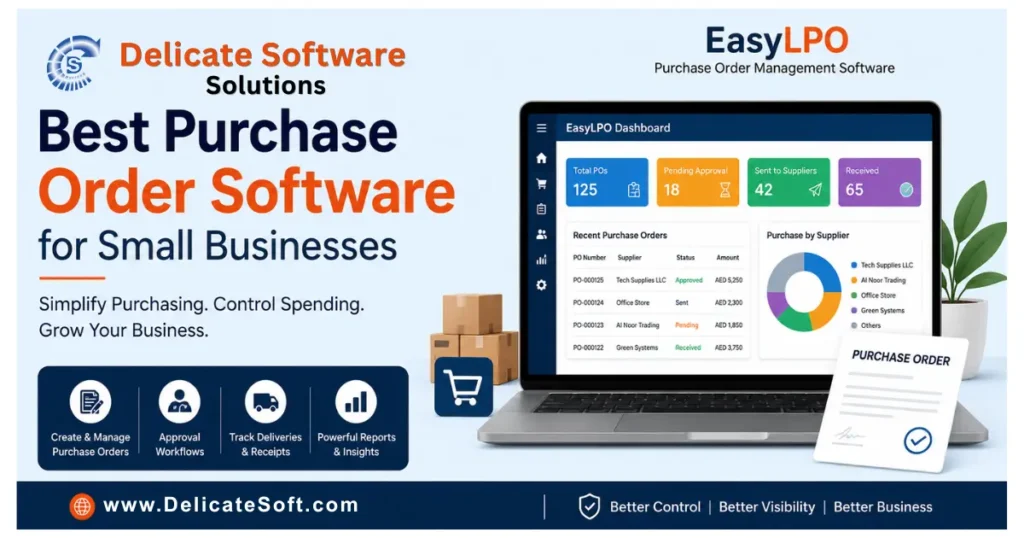
A centralized dashboard provides an overview of purchase orders, pending approvals, supplier activity, spending trends, and monthly purchasing performance.
This helps managers make decisions using organized purchase information rather than manually combining data from multiple files.
5. Affordable and Supported for Business Growth
Small businesses need software that provides value without paying for unnecessary enterprise modules.
EasyLPO is positioned as a focused purchase management solution that helps businesses improve control while keeping the process straightforward. It also supports multi-company and multi-currency requirements, providing flexibility for businesses with growing operational needs.
The EasyLPO team provides Dubai-based support and offers a free product demonstration so businesses can evaluate the software before making a decision.
Is EasyLPO Scalable?
EasyLPO is suitable for businesses that want to move from manual purchase order management to a more organized digital process.
The system supports supplier and item records, approval workflows, purchase receipts, reports, multi-company operations, and multi-currency requirements. These capabilities can support businesses as their purchasing activity becomes more structured.
Before selecting any software, businesses should review their expected purchase volume, number of users, approval requirements, and future integration needs.
Conclusion: Choose Purchase Order Software That Fits Your Business
The best purchase order software for small businesses should provide stronger control without making purchasing more complicated.
An effective system should help purchase managers:
- Create purchase orders faster
- Maintain organized supplier and item records
- Apply approval workflows
- Track full and partial deliveries
- Monitor purchasing activity
- Review spending through clear reports
- Reduce reliance on spreadsheets and manual follow-ups
EasyLPO provides these essential purchase management capabilities through a practical and user-friendly system. It helps businesses organize the purchase cycle from request and approval through supplier communication, receipt tracking, and reporting.
If your business is looking for affordable LPO software that improves purchasing visibility without the complexity of a large ERP system, EasyLPO is worth evaluating.
Ready to simplify your purchase order process? Visit the EasyLPO Purchase Order Management Software page to learn more and book a free demo.